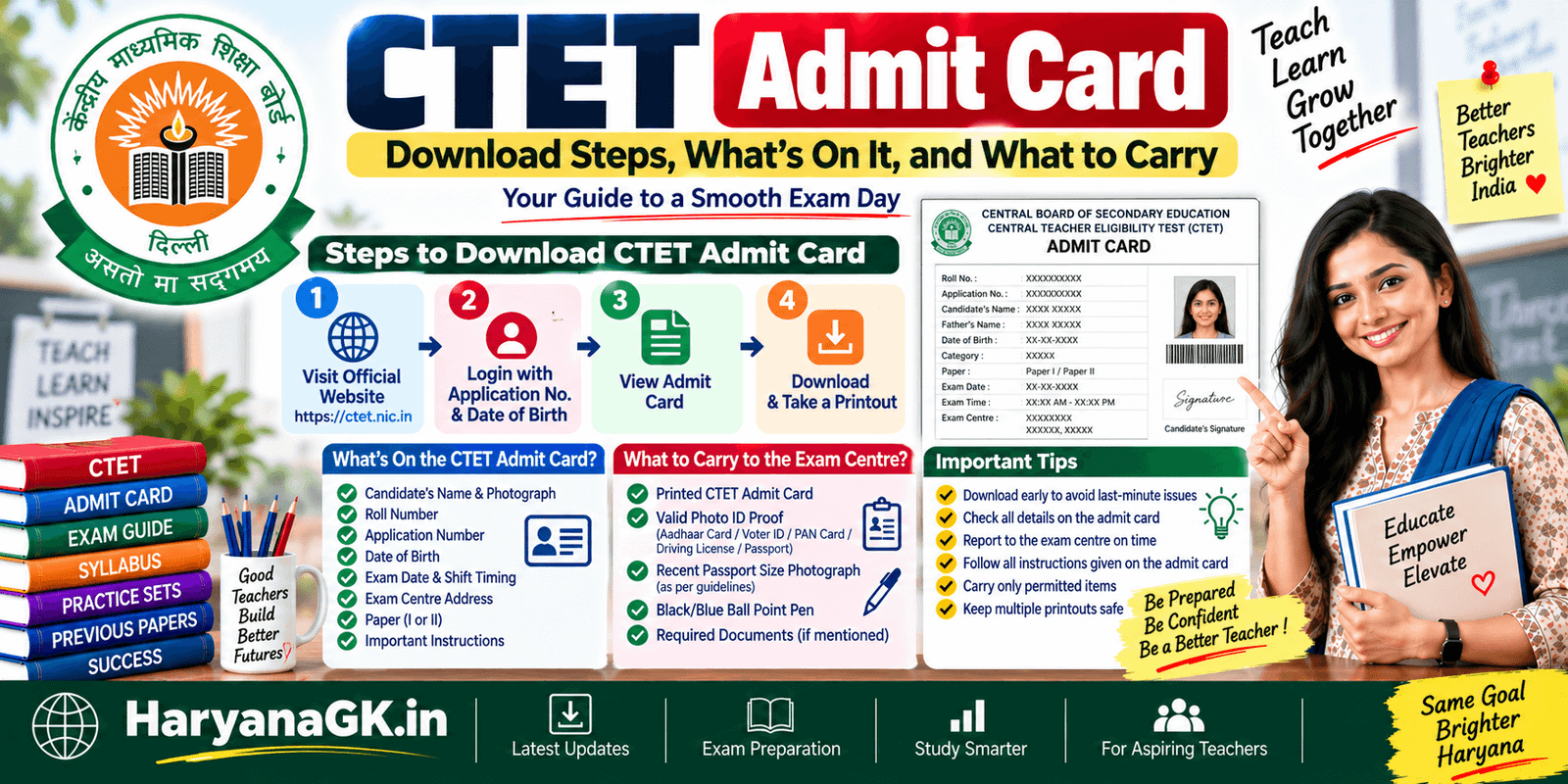
The CTET admit card itself is a two-minute download once it’s live. Most of the confusion candidates run into isn’t the download process, it’s everything around it: the difference between the city slip and the actual admit card, what happens if your photo looks wrong on the printout, and which ID proof actually gets accepted at the gate. This post walks through all of it. If you haven’t applied yet or are still confirming you actually qualify to sit this cycle, our CTET eligibility criteria guide covers that groundwork first.
When does the admit card come out?
CBSE typically releases the CTET admit card a few days to about a week before the exam date, after the exam city intimation slip has already gone out. The two are not the same document. The city slip tells you which city you’ve been allotted, released purely so you can plan travel and accommodation early. The admit card comes later and has your actual exam centre name and address, along with your photograph, roll number, and reporting instructions. Don’t treat the city slip as your entry ticket; you need the admit card itself on exam day.
Exact release dates change every cycle, so the only reliable way to know when it’s live for your session is to check ctet.nic.in directly rather than relying on a forwarded message. CBSE doesn’t send admit cards by post or email; you have to log in and download it yourself.
How to download the CTET admit card
- Go to ctet.nic.in and look for the admit card link, usually posted prominently on the homepage once it’s released, or under “Important Links.”
- Click through to the login page and enter your application number along with your date of birth or password, whichever the portal asks for that cycle.
- Once logged in, your admit card should display on screen. Check every field before you close the tab: your name, father’s/mother’s name, date of birth, photograph, exam centre, exam date, reporting time, and shift.
- Download the PDF and print it. A colour printout isn’t required; black and white on plain A4 paper is accepted, but make sure your photograph is clearly visible and not smudged or too dark to recognise.
- Print at least two copies. You’ll typically need to submit one at the centre along with a self-declaration or undertaking form, and keep the second for your own records in case anything is disputed later.
Is there an official CTET app for this?
No. There is no official CTET mobile app for downloading the admit card, checking your city, or anything else related to the exam. Everything runs through the ctet.nic.in website. If you come across an app in the Play Store or App Store claiming to be the “official CTET app,” it isn’t affiliated with CBSE, and entering your application number, date of birth, or other personal details into it is a real risk, not just an inconvenience. Bookmark the actual website and use that.
Forgot your application number or password?
This happens every cycle to a meaningful number of candidates, usually because they applied months earlier and never wrote the details down anywhere except a screenshot that’s since been deleted. The login page on ctet.nic.in has a “forgot password” or “retrieve application number” option that typically asks for details you’d have used during registration: your registered mobile number, email address, or date of birth combined with your name.
If none of that works, CBSE’s helpline number (published on the same site) is the fallback, though response times during peak admit-card-release days can be slow simply because volume spikes. The lesson for next cycle: save your application number and password somewhere durable the day you register, not the week before the exam.
What if a detail on the admit card is wrong?
Check the moment you download it, not the night before the exam. If your name, date of birth, category, or photograph is incorrect, CBSE usually provides a short correction window right around when the admit card goes live, sometimes tied to the same portal, sometimes through a separate grievance or correction link. Waiting until exam week to report an error leaves you with almost no time to get it fixed, and centre staff generally can’t correct admit card data on the spot. If you spot a mismatch, act on it within the correction window, not after.
Escalating through the helpline and grievance channel
Most admit card problems resolve through the portal itself, but a genuine minority need a human to look at your specific case: your application number shows a completely different candidate’s photograph, your category got recorded wrong despite the certificate you uploaded matching, or the correction window closed before you noticed the error. For these, CBSE’s helpline and grievance portal (both linked from ctet.nic.in) are the actual escalation path, not repeatedly trying the same download link and hoping it fixes itself.
Before you call or submit a grievance ticket, have your application number, registered mobile number, registered email address, and a clear one- or two-line description of the exact discrepancy ready. Vague complaints like “my admit card is wrong” get a slower response than “my category is shown as General on the admit card but I applied and uploaded my OBC certificate under OBC category,” because the second version tells the person handling it exactly what to check. If you’re submitting a written grievance rather than calling, attach a screenshot of the specific screen showing the error rather than describing it in prose alone.
Response times on the helpline spike hard in the days immediately after admit cards are released, since that’s when the largest number of candidates are checking their own downloads for the first time. If you can, check your admit card the same day it’s released rather than waiting, so that if something is wrong, you’re contacting the helpline before the queue backs up rather than during the worst of it.
What information is actually printed on it
Beyond the obvious (name, roll number, photo), the admit card carries a few details candidates often skim past and then get caught out by: your exact reporting time (which is earlier than the actual exam start time), the specific shift you’ve been allotted if the exam runs in multiple shifts that day, the full address of your exam centre down to the building and locality, and any general instructions CBSE has printed directly onto that cycle’s admit card, which can vary slightly from cycle to cycle. Read the instructions section on your specific admit card even if you’ve taken CTET before; a rule that applied last cycle isn’t guaranteed to be worded identically this time.
Planning travel when your allotted city isn’t your home city
Not every candidate gets a centre within easy commuting distance, and if you’re allotted a city that requires overnight travel, the admit card’s arrival is your real signal to stop waiting and start booking. Train and bus tickets for routes near major CTET centres fill up fast in the days right after admit cards go live, since a large number of candidates in the same city are all searching for the same limited seats at once. Booking the day the admit card is released, rather than the day before your exam, is usually the difference between a reasonable fare and a scramble.
Once you have a booking, look up your exact centre address, not just the city name, and check it on a map a day or two in advance rather than on the morning of the exam. Centre addresses sometimes turn out to be a school or institute in a less central part of the city than candidates expect, and local auto or cab availability near unfamiliar addresses can be unpredictable early in the morning.
If your reporting time is early, building in a buffer for the last mile from your hotel or a relative’s place to the actual centre gate matters more than the buffer for the city-to-city leg of the journey, since that’s usually where an unexpected delay actually costs you your reporting window.
Keep a backup plan for the last stretch specifically: a second transport option (an app-based cab alongside a local auto stand, for instance) in case your first choice is unavailable at that hour. Centres do not wait for a candidate stuck in traffic, regardless of how avoidable or unavoidable the delay was, so the backup is worth the small extra planning effort.
Why admit card instructions are worth re-reading even if you’ve appeared before
The overall look of the CTET admit card, name, photo, roll number, centre address, has stayed fairly consistent cycle to cycle, but the fine print underneath it hasn’t always. Requirements around a self-declaration form, specific instructions about what counts as acceptable photo ID, and even details like whether a particular accessory or item is allowed have shifted from one cycle’s admit card to the next as CBSE responds to whatever issues came up in the previous cycle.
A candidate who sat CTET two cycles ago and skips straight to printing this cycle’s admit card without reading the instructions page is occasionally caught out by a requirement that wasn’t there last time, or, just as often, relieved to find a requirement that used to apply no longer does. Either way, the only way to know for certain is to read your own current admit card’s instructions in full, not to rely on memory of a previous cycle.
Documents to carry to the exam centre
Bring the printed admit card itself, plus one original photo ID and a photocopy of it. Accepted IDs typically include Aadhaar card, PAN card, voter ID, driving licence, or passport. A photocopy alone, without the original, is not sufficient; centre staff need to match the physical original against your face and against the ID number you declared during application.
If that cycle’s notification asks for a self-declaration or undertaking form (CBSE has required this in some recent cycles, tied to Covid-era protocols that have occasionally carried forward in modified form), fill it out and bring it along with the admit card. This is exactly the kind of requirement that changes cycle to cycle, so check your own admit card’s instruction page for whether it applies to you.
Clothing, footwear, and small items that can slow you down at frisking
Beyond outright prohibited items, a few ordinary things routinely add friction at the frisking stage without being actually banned. Metal buttons, buckles, or heavy jewellery can trigger a closer manual check with a handheld scanner, adding a few extra minutes you didn’t plan for. Some centres ask candidates to remove shoes with thick soles or any footwear with a metal component for a quick check, so slip-on shoes or simple footwear tend to move you through faster than boots or shoes with buckles.
A transparent water bottle is usually allowed, and often specifically preferred over an opaque one, since staff can visually confirm there’s nothing hidden inside without needing to open and inspect it. None of this is about looking a particular way; it’s purely about what moves through a security check quickly versus what invites a second look, and given how tight the window between reporting time and gate closure can be, shaving a few minutes off frisking is worth planning for.
What not to carry
Leave mobile phones, smartwatches, calculators, geometry boxes, any written or printed material, bags, and pouches outside the centre or in a vehicle. Most centres don’t provide secure storage for personal items, and being caught with a prohibited item, even an unused phone switched off in your pocket, can get your candidature cancelled on the spot rather than just confiscated for the day. If you’re unsure whether something counts as prohibited, don’t bring it.
Verification at the gate
Most centres run a two-step check before you’re allowed to your seat: first, a match between your admit card photo, your original ID photo, and your actual face, done by an invigilator or gate staff; second, a physical frisking check for prohibited items. Some cycles have also included a live photograph capture or signature capture at the centre itself, which gets used later to cross-verify your identity at the result and certificate stage.
None of this is meant to be adversarial, but it does mean showing up with a blurry or years-old photo on your admit card, or an ID where your name is spelled differently than your application, can genuinely slow you down or create a problem right when you have the least time to spare. If your admit card photo and your ID don’t obviously match the same person, sort that out before exam day rather than hoping the gate staff won’t notice.
What the biometric and photo capture step actually involves
Where a live capture is used, it’s typically a quick process at a desk or kiosk near the entry point: a staff member takes your photograph with a webcam or tablet camera, and in some cycles also captures a thumb impression or signature on a digital pad, before you’re allowed further into the centre.
This isn’t meant to be a bottleneck, but it does queue, and the queue moves slower when a candidate’s admit card photo is so outdated or so different in lighting and angle from their current appearance that staff pause to double-check rather than wave them through. A recent, clearly lit photograph on your admit card, taken specifically for this application rather than reused from an old ID, generally moves you through this step faster.
If your fingerprint doesn’t scan cleanly on the first attempt, which happens more often than candidates expect, particularly for anyone whose hands are dry, calloused from manual work, or simply cold from travel, staff usually retry two or three times before falling back to a manual verification using your photo ID alone. This isn’t a sign of a problem with your application; it’s a routine hardware limitation, and staying calm through a few retries gets you through faster than getting visibly frustrated, which tends to slow down the queue behind you as well as your own turn.
Common admit card problems, and what actually fixes them
The download page shows “no record found.” Double-check you’re entering the application number exactly as issued, including any leading zeros, and that you’re using the correct password or date of birth format (DD-MM-YYYY versus DD/MM/YYYY trips people up more often than you’d expect). If the admit card genuinely hasn’t been released yet for your session, the portal will usually say so rather than showing a blank error.
The PDF opens but the photo is missing or shows as a broken image. This is usually a browser rendering issue rather than a real problem with your admit card. Try downloading again in a different browser, or open the PDF in a dedicated reader like Adobe Acrobat instead of viewing it directly in the browser tab.
Your exam centre is in a different city than what your city intimation slip said. This does happen, rarely, when CBSE reallocates candidates between the city slip and admit card stage due to centre capacity issues. Treat the admit card as final and plan travel accordingly; if the change came with very little notice and creates a genuine hardship, CBSE’s helpline is the right channel to flag it, though there’s no guarantee of a reallocation this late.
Reporting time versus exam start time
The reporting time printed on your admit card is earlier than when the actual paper begins, usually by 30 minutes to an hour, to allow time for frisking, seat verification, and biometric or photo matching if that’s in use for the cycle. Gates typically close a set time before the exam starts and late entry isn’t permitted, no matter how good your reason is. Plan your travel assuming the reporting time is your real deadline, not the exam start time. Once you’re actually seated, the paper itself runs to the structure covered in our CTET exam pattern and dates guide, so it’s worth reviewing that alongside your admit card rather than the night before.
Losing your admit card before the exam
If you’ve misplaced the PDF or the printout, log back into the same portal with your application number and credentials and download it again. It doesn’t expire after one download, and there’s no separate “reissue” process; it’s the same file, available to redownload as many times as you need before the exam.
If you need a scribe or extra time as a PwD candidate
Candidates with benchmark disabilities who are entitled to a scribe, compensatory time, or other exam accommodations under the relevant guidelines need to have applied for this at the registration stage, not requested it on exam day. The admit card for PwD candidates approved for these accommodations usually carries a specific note or annexure confirming the approved facility. If your admit card doesn’t reflect an accommodation you applied for and were expecting, raise it through CBSE’s grievance channel well before the exam date rather than at the centre, since centre staff generally can’t grant accommodations that aren’t already recorded against your application.
If you’re bringing your own scribe rather than being assigned one by the centre, that scribe typically needs to meet specific qualification criteria set out in the guidelines, generally someone with a qualification lower than what you’re attempting to qualify for through the scribe’s own writing, and you’ll usually need to have declared the scribe’s details, sometimes including their own photo and signature, during the application or a subsequent scribe-nomination step rather than showing up with an unlisted person on exam day. Both you and your scribe will typically need to carry photo ID at the gate, and gate staff will verify the scribe’s identity against the details on record just as carefully as they verify yours.
At the centre itself, PwD candidates with approved accommodations are usually seated separately from the general hall, in a room or section set up to accommodate a scribe reading and writing alongside the candidate without disturbing other test-takers. Compensatory time, where approved, is generally added at the end of the standard two-and-a-half-hour window rather than running as a separate shift, so confirm with the invigilator at the start of the exam exactly how the additional time will be tracked and announced in that specific hall, since the practical arrangement can vary slightly centre to centre even when the entitlement itself is standard.
If anything about the seating, scribe arrangement, or timing doesn’t match what your admit card confirms, raise it with the centre superintendent immediately, before the exam starts, rather than after, since accommodations are far easier to correct in the minutes before the paper begins than once it’s underway.
The night before: a short checklist
Most last-minute admit card panic is avoidable with a five-minute check the evening before rather than the morning of. Lay out the printed admit card and look at it under a normal light, not your phone’s torch, to confirm the photograph is still clearly visible and the print hasn’t smudged or faded since you printed it days earlier.
Set the original ID next to it and check the name spelling matches exactly; a middle name present on one and missing on the other is a common, avoidable snag. Have both pens ready (a spare is worth the two rupees it costs, since a dry ballpoint an hour before an exam is a genuinely bad time to discover it), and pack them somewhere you won’t forget, like directly inside the folder holding your admit card rather than loose in a bag.
Recheck your route and your transport booking one final time rather than trusting a booking you made days ago to still be valid; cancellations and schedule changes on shared transport happen more often than people expect. Set your alarm with a buffer beyond what you think you need, accounting not just for the journey but for the last-mile stretch from your drop-off point to the actual gate, since that’s usually where an unexpected ten minutes gets lost.
If you’re travelling to an unfamiliar city, confirm you know the exact building name and locality, not just the general area, since a centre address that looks straightforward on paper can still take longer to locate in person than expected, especially before sunrise when signage and shopfronts you’d normally use as landmarks aren’t open yet.
If someone else’s device or a cyber cafe was used to apply
A specific problem shows up every cycle: a candidate applied from a cyber cafe, a friend’s phone, or a relative’s email address, and by the time the admit card is released, they no longer have access to that device, that email inbox, or even remember which email was used. This matters because the admit card download and any correction request both run through the same login, tied to the application number and the registered contact details from months earlier.
If you still remember your application number but have lost access to the registered mobile number or email, the portal’s recovery option is still your first stop, since it may offer an alternate verification path using your date of birth and category details rather than requiring the original contact method. If that doesn’t work, this becomes a case for CBSE’s helpline or grievance channel rather than something you can self-resolve, and it’s worth raising as early as possible once you realize there’s a problem rather than waiting until the week of the exam, since regaining access to a registered contact detail sometimes needs manual verification on CBSE’s end.
If you genuinely can’t recall your application number at all, check any confirmation SMS, email, or payment receipt from the original application, since the application number is usually present somewhere in that paper trail even if you didn’t note it down separately. Going forward, the practical fix is simple: register with a mobile number and email address you personally control and check regularly, not a shared or borrowed one, exactly because months pass between applying and needing to log back in.
Printing it properly
This sounds trivial until it isn’t: print on plain A4 paper, not on a smaller size that crops out part of the form, and don’t rely on a photo of the screen taken on your phone instead of an actual printout. A photograph of a laptop screen showing your admit card, however clear it looks to you, is not accepted as a substitute for a printed copy at most centres. If you don’t have a printer at home, a local cyber cafe or print shop is worth the trip a day or two before the exam rather than scrambling on the morning of.
Once the exam itself is behind you, the admit card’s job is mostly done, but keep the printed copy until results are out anyway, since some cycles ask you to reconfirm details from it during the objection process on the CTET answer key, and having it on hand saves you a scramble later.
If you applied for both Paper 1 and Paper 2
Candidates appearing for both papers usually get a single admit card covering both shifts on the same day, or occasionally two separate admit cards depending on how that cycle’s system generates them. Either way, check that both your Paper 1 and Paper 2 exam centre and shift details are present and correct, since it’s easy to assume one document covers everything and only notice a missing detail for the second paper after it’s too late to raise it.
FAQs
Will CBSE send me a hard copy of the admit card by post? No. The admit card is only available as a digital download from ctet.nic.in. You print it yourself.
How many printouts of the admit card should I carry? At least two: one to submit or show at the centre and one to keep for your own record.
Can I download the admit card using only my roll number? No, not before the exam. Before the exam, you need your application number along with your date of birth or password. Roll number-based lookups typically become relevant later, at the result stage, not the admit card stage.
What happens if there’s an error in my admit card details? Report it through the correction mechanism CBSE provides around the time admit cards are released, as early as possible. Errors reported at the last minute are very difficult to fix before exam day.
Is the self-declaration form mandatory for every CTET cycle? It depends on that cycle’s specific notification. Check the instructions printed on your own admit card rather than assuming based on a previous cycle, since this requirement has been added and dropped across different sessions.
Can I enter the exam centre after the reporting time has passed? No. Gates close at a fixed time before the exam starts, and late entry is not allowed regardless of the reason for the delay. Arrive well before your printed reporting time, not the exam start time.
Is the exam city on my admit card the same as the one on my city intimation slip? It should be, since the city intimation slip is generated from the same allotment. If you notice a mismatch between the two, treat the admit card as the current, authoritative document and raise a query with CBSE if the discrepancy looks like an error rather than an update.
Is there an official CTET app to download the admit card from a phone? No official app exists. Use ctet.nic.in directly, in a mobile browser if that’s all you have access to, rather than any app claiming to be CTET’s official one.
Can I use my college ID card as photo identification at the centre? It depends on the specific list of accepted IDs printed on that cycle’s admit card, but college IDs are generally not on the standard list. Carry a government-issued photo ID (Aadhaar, PAN, voter ID, driving licence, or passport) to avoid any risk of being turned away.
Do I need to bring my own pen, or is one provided? CTET is an OMR-based exam, and candidates are typically expected to carry their own black or blue ballpoint pen since centres don’t reliably provide one for every candidate. Check the specific instructions on your admit card, since this detail is exactly the kind that can vary by cycle.
Who do I contact if the helpline isn’t picking up around admit card release? Try the grievance or query portal linked from ctet.nic.in as a parallel channel rather than only redialling the phone line, since written queries get logged and queued even when call volumes are too high to get through. Keep your application number and a clear description of the issue ready either way.
Can I bring a family member or friend to accompany me to the centre? Generally, only the candidate (and an approved scribe or companion for PwD candidates with a recorded accommodation) is permitted past the entry point. Anyone accompanying you for travel purposes will typically need to wait outside the centre premises rather than in the compound itself.
My admit card photo is old and doesn’t look much like me anymore. Is that a problem? It can slow you down at the gate-matching and biometric steps even if it doesn’t disqualify you outright, since staff may pause to confirm identity more carefully. Where the portal allows a photo update before the admit card is generated, use it; where it doesn’t, carry additional government photo ID and be prepared for a slightly longer verification.